Start with the account picture
The Okta overview brings active accounts, MFA enrollment, returned administrators and 90-day inactivity flags into a small set of clearly labeled measures. Clients can orient themselves before exploring the details.
Okta reporting
Give your clients a readable view of their Okta information. Review enrollment, accounts and historical observations together, then turn questions into a conversation with your team.
Okta reporting in practice
The Okta overview brings active accounts, MFA enrollment, returned administrators and 90-day inactivity flags into a small set of clearly labeled measures. Clients can orient themselves before exploring the details.
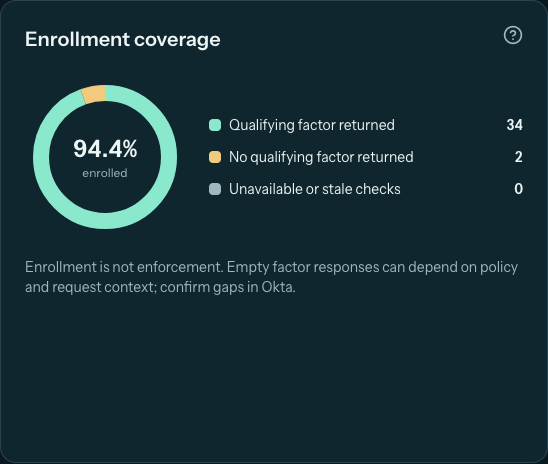
Enrollment charts, authentication-method breakdowns and recorded Okta activity help explain what the connection has observed. The account directory supports searching and filtering so a review can focus on the accounts that matter to the conversation.
Retained history and the change timeline show differences between successful observations. Newly observed does not necessarily mean newly created, and no longer observed does not prove deletion. Observation dates describe when information was collected, not necessarily when an event happened.
Question buttons on Okta sections open a ticket form with the section’s title and context already prepared. With a configured helpdesk, the client can send their question to your team. PDF export makes the same information useful outside the portal.
MFA enrollment is different from MFA enforcement. Returned administrators reflect what the integration can see, and inactivity flags are findings to investigate. Permissions, collection windows and stale checks can affect the available evidence. GuardLume presents observations; it does not guarantee protection.
Good questions
No. Okta remains the source system. GuardLume provides a client-facing view of collected information, reporting and follow-up workflows.
Do not assume so. Available history depends on what the integration can collect and what GuardLume has retained. The displayed dates and collection coverage provide context for each review.
Keep exploring
Your next client experience
Give clients a shared place to review the information and work with your team.
Allow Google Analytics to measure visits to our public website using analytics cookies? Your choice won’t affect access to GuardLume. You can change it anytime using Analytics preferences below.